EdgeRouter Grouping Demo
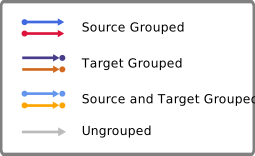
This demo shows the possibilities of edge and port grouping using the
EdgeRouter. Edge groups lead to edges sharing some segments while port
groups will combine the edges only in their first segment.
Things to Try
-
Use the combo-box in the toolbar to toggle between edge grouping and port grouping.
-
Customize the grouping information in the graph using the context menu. You can either:
- Right-Click on the canvas and group/ungroup all edges at the same time
-
Right-Click on an edge or selection of edges and group/ungroup the incident edges
-
Right-Click on a node or selection of nodes and group/ungroup the incident edges
- Reset the graph and start again with the initial sample.
Grouping Types